Turning my daily practice checklist into an offline mobile PWA
An offline mobile PWA that now needs just three daily entries—focused reading, exercise, and journaling—to summarize progress and export an image.
In this article
Results, evidence, and limitationsTranslated from Chinese. Read the Chinese original
The problem and the idea
The checklist website already generated images quickly, with little effort or extra processing. But I still had to open its URL. It felt like a web tool rather than a small app I could reach for every day.
At this stage, the question was specific: if I installed the editor on my phone’s home screen and aligned its launch URL with the offline cache, could it run in a standalone window and keep doing its core job without a connection?
Constraints and decisions
I kept three constraints: no accounts, no cloud sync, and no expansion into a general-purpose habit tracker. The product remained focused on a recurring task: entering the day’s information on a phone and exporting a checklist to share.
The key decision was to align the PWA installation entry, launch URL, and offline cache path, and make the local test server reproduce Cloudflare Pages’ URL normalization. Tests would then face routes closer to production, instead of an ideal environment that was easier to pass.
What I made and checked
- A PWA that can be installed on the phone’s home screen;
- An icon that opens the checklist workspace in a standalone window, without a browser address bar; the preview is shown first, with an editing view available;
- Automatic saving in the current browser;
- A live 1080 × 1536 checklist preview;
- PNG downloads, JSON backups, and offline use.
You can open the editor or find the source, tests, and instructions in the GitHub repository . The tool’s interface is in Chinese.
Automated checks covered the launch entry, standalone mode, autosave, backup restoration, image dimensions, and offline downloads. I then tested each item on a real Android phone:
- Launches from the home-screen iconPassed
- No browser address bar after launchPassed
- Opens the editor directlyPassed
- Data remains after closingPassed
- Can edit and download an image offlineFailed initially; passed after the fix
The fifth check failed on the first attempt: a cold start without a connection produced ERR_FAILED. Local tests had passed, so the test environment clearly did not reproduce deployment behavior.
Cloudflare Pages redirects /editor.html to the normalized /editor route. The old offline cache and installation entry used different routes. I aligned the launch and cache paths and changed the local server to reproduce Cloudflare Pages routing. Local tests, automated checks on the production domain, and a retest on the same phone then passed.
V2: reducing daily input to three facts
V1 established that the tool could be installed, run offline, and export images. Continued use revealed another problem: too many daily fields made the tool itself compete for my attention.
V2 reduced daily input to three things:
- Minutes of “boundary-breaking practice”—my name for focused reading and critical-thinking practice;
- Today’s exercise status;
- Whether I had finished my journal.
The reading entry changed from keyboard input to a slider from 0–180 minutes in 5-minute steps, with 90 minutes marked as the current target. Moving it updates the value, weekly totals, and public PNG together. Exercise and journaling remain status choices.
Weekly information no longer needs to be entered twice: the tool totals focused-reading time and strength-training sessions. The current stage, book, investment status, and weekly deliverable remain available as less frequently changed settings.
The original boundaries remain:
- No accounts;
- No cloud sync;
- No attempt to become a complete health database;
- No publication of private blood-glucose, symptom, or raw sleep records;
- Browser-local storage and manual backups remain the main approach.
Deployment stayed simple too. Checklist uses Cloudflare Pages Direct Upload, with a single deployment command run locally. GitHub Actions validates the code; it does not maintain additional Cloudflare secrets.
The tool now has another role: a low-effort way to record and share my daily-routine experiment. The more complicated judgments stay in the blog and experiment reviews. Checklist takes today’s facts and handles the totals and image generation.
Limits and boundaries
- Data lives in the current browser’s local storage by default.
- Clearing site data or uninstalling the browser can lose it; backups must be exported deliberately.
- Initial installation and new versions require a connection.
- The fields serve my own practice checklist, rather than a general-purpose habit tracker.
- This stage established technical usability. It did not establish long-term gains in efficiency.
What I learned and what comes next
The most useful result was the real phone failure that exposed a blind spot in the automated tests. Tests become evidence only when they cover real deployment behavior and real use.
My rule for further changes is simple: without an actual failure or a clear need, I will not add features merely to make the product look complete.
Results, evidence, and limitations
Results and supporting material, with the questions that remain open.
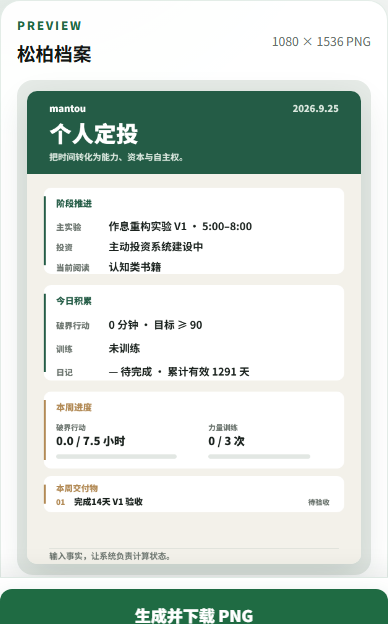
V1 added installation and offline use. V2 reduced daily input to focused-reading minutes, exercise status, and journaling status, with weekly totals and one-click 1080 × 1536 PNG export.
V1 passed five checks on a real Android phone. V2 passed code validation and is deployed, and is being used to record and share progress in my daily-routine experiment.
Data stays in the current browser and does not sync automatically between devices. Initial installation and updates need a network connection.
Use it to record focused reading, exercise, and journaling in the routine experiment. Add features only when a specific difficulty appears again.
Decisions along the way
The web generator was quick to use, but I still had to open a URL. Offline cold starts had not been verified on a real phone.
Installing the editor as a PWA and matching the launch URL to its cached route would let it perform its core task as a lightweight standalone app.
No accounts, cloud sync, or complicated settings. Keep a single page, a short interaction, and local data storage.
Align the installation entry and Cloudflare route, make automated tests reproduce production routing, and retest on a real phone.
What happened after publication
Feedback and uses recorded after publication.
What came back
Continued use showed that too many daily fields consumed attention. V2 reduced them to focused-reading minutes, exercise status, and journaling status, with automatic weekly totals. “Boundary-breaking practice” is my internal name for focused reading and critical-thinking practice. This feedback from actual use directly changed the product.
Where it was used
- Daily-routine experiment V1
Reused installation, offline support, local storage, and PNG generation to record and share the routine experiment, instead of building another logging tool.
- “I do not want my personal blog to become a display cabinet”
Reused the offline failure, fix, and phone retest as a central example in a later article about how I use this blog.